
Overview
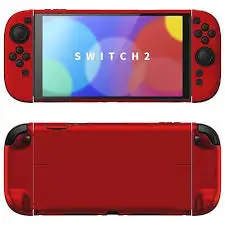
The Nintendo Switch 2 is an investment — and like any handheld device, it’s vulnerable to scratches, drops, and everyday wear. The PlayVital Hard Case offers a full-body protective shell made of sturdy PC material, designed specifically for the Switch 2. Unlike many bulky cases, this one is dockable — you can slide your Switch 2 into the TV dock without removing the case. The split design (separate covers for the console and Joy‑Cons) makes installation easy and improves handheld grip comfort. This Cherry Blossoms Pink edition also includes bonus accessories: thumb grip caps, a foldable stand (replaces the built‑in kickstand), and a card slot cover. Is it the perfect balance of protection and convenience? Let’s find out.
What’s Included in the Complete Kit
| Item | Quantity |
|---|---|
| Hard shell case (console back cover) | 1 |
| Left Joy‑Con grip cover | 1 |
| Right Joy‑Con grip cover | 1 |
| Thumbstick grip caps (pair) | 1 set (2 caps) |
| Foldable stand (replaces built‑in kickstand) | 1 |
| Card slot cover (microSD/game card cover) | 1 |
| Instruction manual | 1 |
Note: The Cherry Blossoms Pink color refers to the case itself — a soft, pastel pink with a smooth finish.
Key Features & Benefits
🛡️ Hard Shell, Dockable & Slim
The case is made from sturdy PC (polycarbonate) material — the same hard plastic used in many rugged phone cases. Benefits:
- Shock‑resistant – Absorbs impacts from drops.
- Scratch‑proof – Protects your Switch 2’s original finish from keys, zippers, and surfaces.
- Slim profile – Adds very little bulk compared to rubber or silicone cases.
- Fully dockable – You can slide the Switch 2 into the official Nintendo Switch 2 dock without removing the case. This is a huge convenience for players who switch between handheld and TV mode frequently.
Note: The case is NOT compatible with the Joy‑Con 2 Charging Grip (the accessory that charges Joy‑Cons while attached to a grip).
✋ Split Design – Easy Install & Comfortable Grip
Unlike one‑piece cases that wrap around the entire device, PlayVital uses a split design:
- Separate covers for the main console and each Joy‑Con.
- Easy installation – Snap on each piece individually. No stretching or forcing.
- Easy removal – Pop off the Joy‑Con covers first, then the console cover.
The Joy‑Con grip covers have raised support on the bottom (palm area). This makes the Switch 2 more ergonomic, reducing hand fatigue during long gaming sessions — especially in handheld mode.
🔌 Full Access Cutouts – No Removal Needed
Precision cutouts give you access to everything:
- All buttons (triggers, bumpers, face buttons, D‑pad)
- Ports (USB‑C, headphone jack)
- Vents (for cooling)
- Game card slot
- Kickstand area (though you may replace the built‑in kickstand with the included stand — more below)
You can charge, use headphones, and play in docked, tabletop, or handheld mode without removing the case.
🧰 Complete Kit – Stand & Thumb Grips
This isn’t just a case. PlayVital includes several useful extras:
| Accessory | Purpose |
|---|---|
| Thumbstick grip caps | Soft silicone caps that improve traction, reduce thumb fatigue, and protect the original joysticks from wear. They also add a slight height increase for better precision. |
| Foldable stand | Replaces the built‑in kickstand (which is often flimsy). This stand is sturdier, has multiple angle adjustments, and folds flat when not in use. |
| Card slot cover | A small protective flap that covers the microSD/game card slot. Keeps dust out and prevents accidental ejections. |
These extras add genuine value — buying them separately would cost $10–15.
🎨 Cherry Blossoms Pink Aesthetic
The solid color series offers a beautiful, soft pink finish reminiscent of cherry blossoms. Benefits:
- Matte or smooth finish (depends on the exact model) – resists fingerprints.
- Not transparent – Covers the original Switch 2 color completely. If you have a white or special edition console, it will be hidden.
- Feminine or playful look – Stands out from basic black or gray cases. Great for players who want personalization.
Pros (Advantages)
✅ Fully dockable – Huge convenience. No removing the case every time you want to play on TV.
✅ Hard PC shell – Excellent scratch and drop protection better than silicone or TPU cases.
✅ Split design – Easy to install/remove; doesn’t stress the device.
✅ Improved ergonomics – Raised palm grips reduce hand fatigue.
✅ Full access cutouts – Every button, port, and vent is accessible.
✅ Complete kit – Includes thumb grips, foldable stand, and card slot cover (great value).
✅ Cherry Blossoms Pink color – Unique, attractive, and fingerprint‑resistant.
✅ Slim profile – Doesn’t make the Switch 2 feel bulky.
✅ Travel friendly – Protects inside backpacks without adding much weight.
✅ Affordable – Typically $15–25 for the full kit, which is excellent value.
Cons (Disadvantages)
❌ NOT compatible with Joy‑Con 2 Charging Grip – If you use that accessory, you’ll need to remove the Joy‑Con covers.
❌ Hide’s the original Switch 2 design – If you bought a special edition console (e.g., Zelda or Mario themed), this case covers it completely. Clear cases are better for showing off original colors.
❌ Hard shell = less grip than silicone – PC plastic can feel a bit slippery compared to soft rubber cases. The raised grips help, but it’s not as tacky as silicone.
❌ Dock fit can be tight – Most dockable cases work, but some third‑party docks (or docks with skins) may be too snug. The official Nintendo dock should be fine.
❌ Thumb grips may be too soft for some – They protect the joysticks but can feel mushy if you prefer a firm, textured stick.
❌ Foldable stand replaces the built‑in one – You have to remove the original kickstand (or it’s covered by the case). If you lose the included stand, you lose the ability to prop up your Switch 2.
❌ Not a drop-proof rugged case – This is a hard shell for scratches and minor drops. For serious drop protection (e.g., for kids), look for a TPU bumper case with thicker corners.
Installation Tips
- Clean your Switch 2 – Remove dust and fingerprints before installing.
- Install the console back cover first – Snap it onto the back of the main unit.
- Install the Joy‑Con covers – Slide each Joy‑Con into its respective cover. They should click into place.
- Attach thumb grips – Push them firmly onto each joystick.
- Replace the kickstand (if using the included stand) – Remove the original built‑in kickstand (gently pull it open and unclip it – check online for Switch 2 specific instructions). Snap the PlayVital stand into the same slot.
- Install the card slot cover – Peel and stick (or snap on, depending on design) over the microSD/game card slot.
Who Is This For?
This case is perfect for:
- Nintendo Switch 2 owners who want everyday scratch protection without bulk.
- Players who dock frequently – The dockable design saves time and hassle.
- Anyone who finds the standard Switch 2 uncomfortable – The raised palm grips genuinely help with hand fatigue.
- People who want a complete kit – Having thumb grips and a better stand included is a nice bonus.
- Aesthetic‑minded gamers – Cherry Blossoms Pink is unique and cheerful.
- Travelers – Protects the device in bags without adding much weight.
- Gift givers – A practical, attractive accessory for a Switch 2 owner.
Who Should Skip This?
- Players who use the Joy‑Con 2 Charging Grip – You’d have to remove the Joy‑Con covers every time.
- Those who want clear cases – This solid color hides the original console finish.
- Kids or clumsy users – For serious drop protection, consider a rugged bumper case (e.g., from Spigen or Nyko).
- People who dislike hard plastic – If you prefer soft, grippy silicone, look elsewhere.
Comparison with Other Case Types
| Feature | PlayVital Hard Shell (Dockable) | Clear TPU Case | Rugged Bumper Case | Silicone Skin |
|---|---|---|---|---|
| Dockable | Yes | Usually | Sometimes (bulky) | Yes |
| Scratch protection | Excellent | Good | Excellent | Good |
| Drop protection | Moderate | Moderate | Excellent | Poor |
| Grip | Moderate (smooth) | Good (tacky) | Excellent (rubberized) | Excellent |
| Bulk added | Minimal | Minimal | Significant | Minimal |
| Shows original color | No (solid) | Yes | Varies (often clear) | Varies |
| Ergonomics (palm grips) | Yes (raised) | No | Sometimes | No |
| Includes extras (thumb grips, stand) | Yes | Rarely | Sometimes | Rarely |
| Price | $15–25 | $10–15 | $20–35 | $10–15 |
Verdict: PlayVital wins on dockable convenience, included extras, and ergonomic palm grips. Rugged cases win on drop protection. Clear TPU wins if you want to show off a special edition console.
Care & Maintenance
- Clean with a damp microfiber cloth – Avoid harsh chemicals.
- Remove the case periodically – Dust can accumulate underneath. Clean both the case and the console.
- Check for fit after drops – If you drop your Switch 2, inspect the case for cracks (PC plastic can crack under hard impact).
- Thumb grips can be washed – Remove them, wash with mild soap and water, dry completely before reattaching.
Final Verdict
The PlayVital Hard Case for Nintendo Switch 2 in Cherry Blossoms Pink is an excellent balance of protection, convenience, and aesthetics. The dockable design is a lifesaver for players who switch between handheld and TV mode frequently — no more fumbling with case removal. The split design makes installation easy, and the raised palm grips noticeably improve comfort during long gaming sessions.
The included thumb grip caps and foldable stand add real value. You’re getting a complete kit for a price that’s often less than the case alone from other brands. The Cherry Blossoms Pink color is soft, attractive, and stands out from the sea of black and gray accessories.
Is it perfect? No. It’s not compatible with the Joy‑Con Charging Grip, the hard shell can feel a bit slippery, and it hides the original console’s color. But for everyday protection, dockable convenience, and a beautiful pink finish, this is a fantastic choice.
If you want a slim, protective, and stylish case for your Switch 2 — especially if you love pink — the PlayVital kit is highly recommended.