
Overview
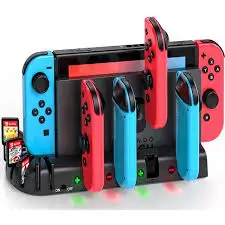
If you own a Nintendo Switch, you know the frustration: you’re ready for a multiplayer session, but one pair of Joy‑Cons is dead. The GLDRAM 4 in 1 Joypads Charger Grip solves this problem by combining four charging slots with two convertible controller grips — all in one compact dock. You can charge up to four Joy‑Cons simultaneously, then detach the grips for comfortable gameplay. The dock features LED indicators (blue for complete/empty, orange for charging, and a cool green projection when plugged in), built‑in intelligent chip protection (overcharge, overcurrent, overvoltage), and a high‑quality ABS shell. It also allows you to play while charging — a lifesaver for marathon gaming sessions. But is it well‑built? Does it work with grip cases? Let’s dive in.
What’s Included
| Item | Quantity |
|---|---|
| 4 in 1 Charger Grip dock (main unit) | 1 |
| Convertible controller grips (left and right) | 2 (attached to the dock) |
| USB‑A to USB‑C charging cable | 1 |
| User manual | 1 |
Note: Joy‑Con controllers are sold separately.
Key Features & Benefits
🎮 Multi‑functional – Charge 4 Joy‑Cons at Once
The primary function is charging. The dock has four charging pillars (two on each side) that hold Joy‑Cons vertically. Benefits:
- Charge up to four Joy‑Cons simultaneously — perfect for families or multiplayer households.
- Saves time compared to charging one pair at a time on the Switch console.
- Keeps your Joy‑Cons organized and ready to play.
The dock also converts into two controller grips — slide the left and right sections off the base, and you have two ergonomic grips for tabletop or detached play.
🔋 Play While Charging
This is a standout feature. Even if your Joy‑Cons are completely drained:
- Attach them to the convertible grips (which are connected to the dock via cables — the grips remain wired to the base).
- Play while the Joy‑Cons charge.
- No need to stop your game.
When not charging, the grips function as standard controller grips — more comfortable than bare Joy‑Cons for tabletop mode.
🔒 Safe and Convenient – Intelligent Chip Protection
The dock includes a built‑in intelligent chip that protects your Joy‑Cons:
- Overcharge protection – Stops charging when batteries are full.
- Overcurrent protection – Prevents damage from power surges.
- Overvoltage protection – Safeguards against unstable power sources.
The shell is made from high‑quality ABS — durable, impact‑resistant, and heat‑resistant. Important safety note: you can use the charging grip without removing your Joy‑Con grip cases (silicone sleeves or thin protective shells). This is a huge convenience.
💡 Charging Indicators – Clear Status at a Glance
Each of the four charging pillars has an independent LED indicator underneath:
| LED Color | Meaning |
|---|---|
| Orange | Charging in progress |
| Blue | Charging complete OR no Joy‑Con detected (empty) |
Additionally, when the dock is plugged in, a cool green projection lights up the base — adding a subtle gaming aesthetic to your setup.
🔌 Easy Installation – No Tedious Steps
Simply:
- Connect the USB‑C cable to the dock and a power source (USB‑A wall adapter, PC, or Switch dock).
- Slide your Joy‑Cons onto the charging pillars (align the rails).
- The dock charges automatically. No buttons, no pairing, no software.
To use as grips: slide the left and right sections off the base. They remain connected to the dock via cables (or detach completely — check the listing). You can then hold them like traditional controller grips.
Pros (Advantages)
✅ Charges 4 Joy‑Cons at once – Huge time‑saver for multiplayer households.
✅ Play while charging – No more waiting for batteries to charge mid‑game.
✅ Converts into two controller grips – Ergonomic and comfortable for tabletop mode.
✅ Intelligent chip protection – Overcharge, overcurrent, overvoltage safety.
✅ Works with Joy‑Con grip cases – No need to remove silicone sleeves or thin protective shells.
✅ Clear LED indicators – Orange (charging), Blue (complete/empty), plus green projection light.
✅ Sturdy ABS construction – Durable and heat‑resistant.
✅ Easy to install – Slide and charge. No complicated setup.
✅ Compact design – Takes up little space on a desk or entertainment center.
✅ Affordable – Typically $20–30, much cheaper than buying multiple charging accessories.
Cons (Disadvantages)
❌ Cable management – When using the grips detached from the base, they are still connected via cables (if you want to play while charging). This can be messy. For wireless grip use, you’ll need to detach them completely (and then they won’t charge).
❌ Not a replacement for the official Joy‑Con grip – The feel may not be as premium as Nintendo’s official grip (which has a more solid, weighted feel).
❌ Green projection light may be distracting – Some users find the green base light too bright in a dark room. It cannot be turned off (unless you unplug the dock).
❌ No pass‑through charging for the Switch console – This dock charges only Joy‑Cons. It does not charge the Switch tablet itself.
❌ USB‑A to USB‑C cable only – The included cable is USB‑A on one end (for standard chargers). If you want USB‑C to USB‑C (e.g., for a modern laptop charger), you’ll need your own cable.
❌ Grip texture – The grips are hard ABS plastic (not rubberized). Some users may prefer a softer, non‑slip texture like silicone.
❌ May not fit all third‑party grip cases – While it works with most thin silicone sleeves, bulky protective cases may prevent the Joy‑Cons from sliding onto the charging pillars.
Who Is This For?
The GLDRAM 4 in 1 Charger Grip is perfect for:
- Families or households with multiple Switch players – Charge four Joy‑Cons at once, ready for Mario Kart, Smash Bros., or Overcooked.
- People who hate waiting for controllers to charge – Play while charging is a lifesaver.
- Tabletop mode enthusiasts – The convertible grips make detached Joy‑Cons much more comfortable.
- Anyone who already uses Joy‑Con grip cases – No need to remove them for charging.
- Gift givers – A practical, thoughtful accessory for any Switch owner.
- Budget‑conscious buyers – Cheaper than buying two separate charging docks plus two grips.
Who Should Skip This?
- Solo players – If you only use one pair of Joy‑Cons and charge them on the Switch console, you don’t need this.
- Pro Controller users – If you never use Joy‑Cons (except for games that require them), this is unnecessary.
- People who dislike cable clutter – The “play while charging” feature requires cables attached to the grips, which can be messy.
- Those who prefer soft rubber grips – These grips are hard ABS plastic. Consider silicone sleeves if you want a softer feel.
- Switch Lite owners – Not compatible (no detachable Joy‑Cons).
Comparison with Other Joy‑Con Charging Solutions
| Feature | GLDRAM 4 in 1 | Nintendo Official Charging Dock (4‑slot) | Generic 4‑Slot Charger (No Grips) |
|---|---|---|---|
| Charges 4 Joy‑Cons | Yes | Yes | Yes |
| Converts to controller grips | Yes (2 grips) | No | No |
| Play while charging | Yes (via cables) | No | No |
| LED indicators | Yes (orange/blue + green projection) | Yes (red/green) | Yes (usually red/green) |
| Overcharge protection | Yes (intelligent chip) | Yes | Varies (cheap ones may lack) |
| Works with grip cases | Yes (most thin cases) | Unlikely (tight fit) | Unlikely |
| Build material | ABS plastic | ABS plastic | Cheap plastic (often) |
| Price range | $20–30 | $25–35 | $15–25 |
| Best for | Multiplayer, play while charging, grip conversion | Official Nintendo quality | Budget basic charging |
Verdict: GLDRAM wins on versatility (grips + charging + play while charging). Nintendo’s official dock wins on brand trust and simplicity. Generic chargers are cheaper but lack safety features and grip functionality.
Setup & Usage Tips
- Connect to a power source – Use a standard USB‑A wall adapter (not included, but you likely have one) or plug into the Switch dock’s USB port. Avoid high‑power fast chargers (though the intelligent chip should protect, standard 5V/1A–2A is safest).
- Slide Joy‑Cons onto pillars – Align the rails as you would with the Switch console. They should click into place.
- Check LED colors – Orange = charging, Blue = complete or empty. If a Joy‑Con doesn’t charge, reseat it.
- To use as grips – Detach the left and right sections from the base. For wireless grip use, simply use them detached (they won’t charge). For play‑while‑charging, keep them connected to the base via the attached cables.
- Store Joy‑Cons on the dock – Makes a great display and charging station.
Maintenance & Safety
- Keep away from liquids – As with any electronics.
- Unplug when not in use for long periods – Saves energy and reduces wear.
- Clean with a dry microfiber cloth – Avoid moisture near the charging pins.
- Check pins periodically – Ensure no debris is blocking contact with Joy‑Con rails.
- Use the included cable – Or a certified USB‑A to USB‑C cable. Avoid cheap, uncertified cables.
Final Verdict
The GLDRAM 4 in 1 Joypads Charger Grip is a clever, space‑saving solution for Nintendo Switch owners who play multiplayer games regularly. The ability to charge four Joy‑Cons at once is a huge convenience, and the convertible grips make tabletop play much more comfortable. The play‑while‑charging feature is genuinely useful for marathon gaming sessions — no more waiting for dead controllers.
The build quality (ABS plastic) is solid, the intelligent chip provides peace of mind, and the LED indicators are clear. The green projection light is a fun aesthetic touch (though some may find it distracting). The grips are hard plastic rather than soft rubber, which may be a downside for some, but they work well with most thin silicone grip cases.
Is it perfect? No. The cable management when using play‑while‑charging can be messy, and the green light can’t be turned off. Also, if you play solo and only use one pair of Joy‑Cons, you probably don’t need this. But for families, roommates, or anyone who regularly hosts multiplayer gaming sessions, the GLDRAM 4 in 1 is a fantastic value at $20–30.