
Overview
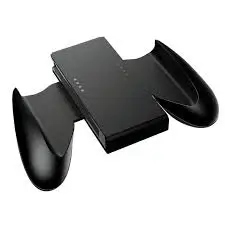
The Nintendo Switch is beloved for its versatility — but let’s be honest: the individual Joy‑Con controllers, while clever, are not the most comfortable for extended handheld or tabletop play. They’re small, flat, and can cause hand cramps, especially for adults with larger hands. The PowerA Joy Con Comfort Grips solve this problem by adding lightweight, ergonomic silicone grips that slide over each Joy‑Con. The result is a more substantial, contoured feel that reduces fatigue during long gaming sessions. These grips feature double‑injected rubber for extra comfort, an easy slide‑in design, and visible cutouts for the player indicator lights. If you play in handheld mode often, this simple accessory might be a game‑changer.
What’s Included
| Item | Quantity |
|---|---|
| Left Joy‑Con comfort grip | 1 |
| Right Joy‑Con comfort grip | 1 |
Note: Joy‑Con controllers are sold separately. This is a 2‑pack of grip covers (one for each Joy‑Con).
Key Features & Benefits
👐 Lightweight, Ergonomic Design
The PowerA Comfort Grips are designed to make your Joy‑Cons feel more like a traditional controller. Benefits:
- Contoured shape – Fits the natural curve of your palms.
- Adds bulk where needed – The grips fill your hands, preventing the “claw” position that causes fatigue.
- Lightweight – Adds very little weight to the Switch; you won’t notice the extra grams.
- Comfortable for all hand sizes – Especially beneficial for adults or anyone who finds bare Joy‑Cons too small.
You can use these grips in handheld mode (attached to the Switch), tabletop mode (detached but gripped), or even with a Joy‑Con grip accessory (the plastic frame that combines both Joy‑Cons into one pad).
🧴 Double‑Injected Rubber Grips for Added Comfort
PowerA uses a double‑injected rubber material on the contact surfaces. What this means:
- Soft to the touch – Not hard plastic. It has a velvety, slightly tacky feel.
- Non‑slip – Sweaty hands won’t lose grip during intense action games.
- Durable – The rubber is bonded to the underlying plastic; it won’t peel off easily.
- Shock absorbing – Minor drops are slightly cushioned (but this is not a rugged case).
The texture strikes a perfect balance between softness and structural integrity — it’s not mushy like some cheap silicone sleeves.
📲 Easy Slide‑In Design – Secures Each Joy‑Con
Installing the grips is simple:
- Hold the grip with the opening facing up.
- Slide the Joy‑Con in from the top (or bottom, depending on design — follow the arrows).
- The Joy‑Con clicks securely into place.
Removal is just as easy — gently pull the Joy‑Con out. The grips hold firmly during gameplay but don’t feel permanently stuck. They also don’t interfere with the SL/SR buttons (the small shoulder buttons used when Joy‑Cons are held sideways).
🔘 Visible Player Indicator Lights
The grips have clear cutouts for the player indicator lights (the small LEDs on the side of each Joy‑Con that show which player is which). Benefits:
- You can still see which controller is Player 1, 2, etc.
- No need to remove the grips to check connection status.
- A small but thoughtful detail that cheaper grips often miss.
Pros (Advantages)
✅ Dramatically improves comfort – Bare Joy‑Cons can be painful after an hour; these grips make hours of play possible.
✅ Lightweight – No noticeable weight increase.
✅ Double‑injected rubber – Soft, grippy, and durable.
✅ Easy to install and remove – Takes 2 seconds per Joy‑Con.
✅ Retains access to all buttons – Shoulder buttons, triggers, joysticks, and face buttons are fully accessible.
✅ Visible player indicator lights – Small but helpful detail.
✅ Works in all modes – Handheld, tabletop, or attached to a Joy‑Con grip.
✅ Affordable – Typically $10–15 for the pair.
✅ Trusted brand – PowerA is a well‑known, licensed accessory manufacturer (though these specific grips are not officially licensed by Nintendo — check the listing).
✅ Fits all Switch models – Works with original Switch, Switch OLED, and Switch Lite? (Lite has integrated controls, so no.) For standard detachable Joy‑Cons only.
Cons (Disadvantages)
❌ Not officially licensed by Nintendo – Some buyers prefer the official Nintendo branding. PowerA is reputable, but these grips don’t have the official seal.
❌ Adds bulk – While the bulk is the point (for comfort), they do make the Switch wider and thicker. The Switch may not fit into some tight travel cases with the grips attached. You may need to remove them before storing.
❌ Can interfere with some docks – The Switch with grips attached may not slide into a third‑party dock or even the official dock (depending on the grip’s thickness). Test yours. You’ll likely need to remove grips before docking.
❌ Not for Switch Lite – The Lite has integrated controls and doesn’t use detachable Joy‑Cons.
❌ No extra features – These are passive grips. No battery, no turbo buttons, no programmable paddles.
❌ Rubber can attract dust – The soft rubber texture can pick up lint from pockets or bags. A quick wipe solves it.
❌ May loosen over time – With repeated removal and installation, the grip may become less snug. PowerA’s quality is good, but all silicone/rubber stretches eventually.
Who Is This For?
The PowerA Joy Con Comfort Grips are perfect for:
- Adults with large hands – Anyone who finds bare Joy‑Cons cramped.
- Handheld mode enthusiasts – If you play mostly in portable mode, these grips are almost essential.
- Players who experience hand fatigue or cramps – The ergonomic shape reduces strain.
- Parents buying for kids – Helps small hands hold the controller more securely.
- Anyone who owns a standard Joy‑Con grip accessory – Use these grips inside the plastic frame for a more substantial traditional controller feel.
- People who prefer silicone/soft grips – The double‑injected rubber is comfortable and non‑slip.
Who Should Skip This?
- Switch Lite owners – Not compatible (integrated controls).
- Players who always play docked with a Pro Controller – You never touch the Joy‑Cons.
- Those who prioritize slim portability – The grips add bulk; you’ll need to remove them for tight cases or docks.
- People who dislike soft rubber textures – Some prefer hard plastic shells (e.g., from Nyko or other brands).
Comparison with Other Grip Options
| Feature | PowerA Comfort Grips | Nintendo Official Joy‑Con Grip (Frame only) | Silicone Sleeves (Generic) | Skull & Co. GripCase |
|---|---|---|---|---|
| Material | Double‑injected rubber over plastic | Hard plastic | Soft silicone | Soft TPU + hard back |
| Grip texture | Soft, tacky | Hard, smooth | Soft, can be floppy | Textured, medium |
| Adds bulk | Moderate | None (just a frame) | Minimal | Significant (full case) |
| Protects Joy‑Cons | Yes (covers back/sides) | No (frame only) | Yes (full sleeve) | Yes (full case) |
| Docks with grips on? | Unlikely (too thick) | Yes (no extra bulk) | Possibly (thin) | Depends on model |
| Visible indicator lights | Yes | Yes | Usually covered | Usually covered |
| Price range | $10–15 | $10–15 (frame only) | $5–10 | $15–25 |
| Best for | Handheld comfort with easy removal | Tabletop/docked with frame | Basic scratch protection | Full protection + grip |
Verdict: PowerA wins on comfort and grip texture. The official Nintendo frame is better for docked play (no bulk). Silicone sleeves are cheaper but flimsier. Skull & Co. offers more protection but at a higher price and bulk.
Installation & Usage Tips
- Install before long gaming sessions – The grips take 2 seconds to slide on.
- Remove before docking – Most docks won’t accommodate the added thickness. Test yours first.
- Remove before storing in tight cases – If your travel case is snug, take the grips off.
- Clean regularly – Wipe with a damp microfiber cloth. Dust and lint can accumulate on the rubber.
- For tabletop mode – The grips make detached Joy‑Cons much more comfortable for two‑player games (e.g., Mario Kart, Super Smash Bros.).
- Combine with a Joy‑Con grip frame – Slide the gripped Joy‑Cons into the plastic frame that came with your Switch. This creates a very comfortable traditional controller.
Maintenance & Longevity
- Clean with mild soap and water – For stubborn dirt, use a drop of dish soap on a damp cloth. Rinse the cloth and wipe again. Let air dry.
- Avoid alcohol wipes – Excessive alcohol can dry out or degrade rubber over time.
- Inspect for stretching – If the grips become loose, they may need replacement (but this takes months or years of heavy use).
- Store in a cool, dry place – Extreme heat can soften rubber; extreme cold can make it brittle.
Final Verdict
The PowerA Joy Con Comfort Grips are a simple, effective, and affordable solution to the Nintendo Switch’s biggest ergonomic flaw: the tiny, flat Joy‑Con controllers. The double‑injected rubber provides a soft, non‑slip texture that feels great in the hands, while the ergonomic contouring fills your palms and reduces fatigue.
No, they won’t turn your Joy‑Cons into a Pro Controller. Yes, you’ll need to remove them for docking and some travel cases. But for handheld or tabletop play, these grips make a world of difference. If you’ve ever felt hand cramps after an hour of Zelda or Hades, these grips will let you play for twice as long without discomfort.
At $10–15 for the pair, they’re a no‑brainer upgrade for any Switch owner who plays in portable mode regularly. They’re especially recommended for adults, parents buying for kids, or anyone who values comfort over ultra‑slim portability.