
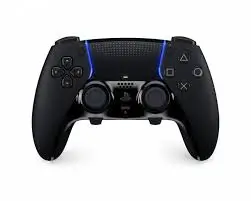
The DualSense Wireless Controller is Sony’s flagship controller for the PlayStation 5, and it represents a massive leap forward from the DualShock 4. The Midnight Black variant offers a sleek, understated alternative to the standard white controller that comes with the PS5. With haptic feedback (not just rumble), adaptive triggers that provide variable tension, a built‑in microphone, and a dedicated mute button, the DualSense changes how you feel games. It also works wirelessly via Bluetooth or wired via USB‑C with PC, Mac, Android, and iOS devices. But is it the best controller on the market? Let’s dive in.
Key Specifications
| Specification | Detail |
|---|---|
| Model | PlayStation DualSense Wireless Controller |
| Color | Midnight Black (matte black finish, subtle grey/black details) |
| Connectivity | Bluetooth 5.1, USB Type‑C (wired) |
| Compatibility | PS5, Windows PC, Mac, Android, iOS (iPad/iPhone) |
| Special features | Haptic feedback, Adaptive triggers, Built‑in microphone, Mute button, Touch pad, Motion sensors (gyro/accelerometer) |
| Audio | 3.5mm headphone jack (for chat/game audio), built‑in speaker |
| Battery | Rechargeable lithium‑ion (USB‑C charging) |
| Buttons | Classic PlayStation layout (D‑pad, face buttons, shoulder buttons, triggers, create/options, PS button, mute) |
| Dimensions | Approximately 6.3″ x 4.2″ x 2.5″ (slightly larger than DualShock 4) |
Key Features & Benefits
👐 Haptic Feedback – Feel the Game
Traditional rumble motors just vibrate. The DualSense uses haptic feedback – high‑precision vibrations that simulate different textures and forces. Examples:
- Driving on gravel vs. asphalt – you feel the difference.
- Drawing a bowstring – tension builds in your hands.
- Rain – subtle, scattered taps across the controller.
- Explosions – deep, heavy, directional rumbles.
This creates a genuinely more immersive experience, especially in PS5 games designed to take advantage of it. On PC/Mac, support varies by game, but many new titles include it.
🔧 Adaptive Triggers (L2 & R2)
This is a game‑changer. The trigger buttons (L2 and R2) can dynamically adjust resistance based on what you’re doing:
- Pulling a tight bowstring – triggers become harder to press.
- Firing a heavy machine gun – triggers pulse with each shot.
- Braking in a racing game – triggers stiffen to simulate ABS.
You actually feel the tension in your fingertips. Again, works best on PS5 titles; PC support is growing.
🎙️ Built‑in Microphone & Mute Button
No headset? No problem. The controller has a built‑in microphone so you can chat online without any extra gear. The dedicated mute button (located below the PS button) lets you instantly turn off voice capture. An orange LED lights up when muted – very convenient.
For private chat or better audio, use the 3.5mm headphone jack on the bottom of the controller. It supports both game audio and voice chat.
📱 Multi‑Platform Compatibility
The DualSense isn’t just for PS5. Connect via Bluetooth or USB‑C to:
- Windows PC – Works with Steam and many PC games (supports haptics/triggers in supported titles).
- Mac – Recognized as a standard gamepad.
- Android – Play mobile games (native support in many titles).
- iOS (iPhone/iPad) – Works with Apple Arcade and MFi games.
Note: On non‑PS5 platforms, advanced features (haptics, adaptive triggers) may be limited or require wired connection. Still, as a standard controller, it’s excellent.
🔋 USB‑Type C & Rechargeable Battery
The controller charges via USB‑C (cable included with PS5, but not always when buying separately – check listing). The battery life is roughly 6–12 hours depending on features used (haptics and triggers drain faster). That’s similar to the DualShock 4 but less than the Xbox Series X controller (which uses AAs). You can play while charging.
🎮 Classic PlayStation Layout with Upgrades
- Touch pad – Large clickable pad (used for menus, swipes, etc.).
- Create button (replaces Share) – Capture screenshots/videos, start streaming.
- Options button – In‑game menus.
- PS button – Return to dashboard.
- D‑pad and face buttons – Familiar, responsive, slightly larger than previous gen.
🖤 Midnight Black Aesthetic
The standard DualSense is white with black accents. The Midnight Black variant is a stealthy, matte black finish with subtle grey/black detailing. Benefits:
- Hides fingerprints and smudges better than white.
- Looks more professional/discreet.
- Matches dark gaming setups or black PS5 console covers (sold separately).
Pros (Advantages)
✅ Haptic feedback is revolutionary – Much more immersive than standard rumble.
✅ Adaptive triggers are a game‑changer – Variable tension adds a new dimension to gameplay.
✅ Built‑in microphone saves money – No need to buy a headset for basic chat.
✅ Dedicated mute button – Instant privacy, with LED indicator.
✅ Multi‑platform – Works with PS5, PC, Mac, Android, iOS.
✅ USB‑C charging – Modern, reversible connector.
✅ 3.5mm headphone jack – Works with any wired headset.
✅ Midnight Black color – Sleek, hides wear, matches dark setups.
✅ Ergonomics – Slightly larger and more comfortable than DualShock 4 for medium/large hands.
✅ Motion controls – Gyro/accelerometer for supported games.
✅ Built‑in speaker – Adds immersion (hearing in‑game sounds from the controller).
Cons (Disadvantages)
❌ Battery life is mediocre – 6–12 hours is fine but less than the Xbox controller (which uses AAs you can swap instantly). When the DualSense dies, you must plug it in.
❌ No charging cable included when bought separately – The PS5 includes a USB‑C cable, but if you buy a standalone controller, check the box. Many listings do NOT include the cable.
❌ Advanced features (haptics/triggers) are limited on non‑PS5 – PC/Mac support is growing but not universal. On Android/iOS, you get standard controller functions only.
❌ Larger than DualShock 4 – People with small hands may find it less comfortable.
❌ Joystick drift issues – Some users report drift over time (though Sony has improved manufacturing).
❌ No rear paddles – Competitive gamers may miss back buttons (available via third‑party add‑ons or the 200DualSenseEdge).❌∗∗Touchpadisunderutilized∗∗–Manygamesignoreitoruseitsimplyasalargebutton.❌∗∗Canbeexpensive∗∗–Typically70–75, more than Xbox controllers ($50–60) and much more than third‑party options.
Who Is This For?
The DualSense Midnight Black controller is perfect for:
- PS5 owners – The default (and best) way to play PS5 games.
- PC gamers – Especially those playing newer games that support haptics/triggers (e.g., Cyberpunk 2077, Call of Duty, Death Stranding).
- Mac gamers – For Apple Arcade or Steam titles.
- Mobile gamers – Play Call of Duty Mobile, Genshin Impact, or other controller‑supported games on Android/iOS.
- People who dislike white controllers – The Midnight Black looks cleaner and hides dirt.
- Second controller for local multiplayer – Great for fighting games, sports games, or co‑op.
- Backup controller – Essential if your original DualSense wears out or has drift.
Compatibility Details by Platform
| Platform | Wireless (Bluetooth) | Wired (USB‑C) | Haptics & Triggers | Mute Button | Touch Pad |
|---|---|---|---|---|---|
| PS5 | Yes | Yes | Full support | Yes | Full support |
| Windows PC (Steam) | Yes | Yes | In supported games (wired often required) | No (PC doesn’t recognize) | Basic (as mouse) |
| Mac | Yes | Yes | Limited | No | Basic |
| Android | Yes | Yes | No (standard controller only) | No | Basic |
| iOS (iPhone/iPad) | Yes (iOS 14.5+) | Yes (with adapter) | No | No | Basic |
Tip for PC gamers: For best compatibility, use a wired USB‑C connection for haptics/triggers in supported games. Also, update the controller firmware via the PS5 or the Windows app.
Setting Up on PC/Mac (Quick Guide)
- Bluetooth: Pair as any Bluetooth device (hold PS button + Share button until light bar flashes).
- Wired: Plug in USB‑C to USB‑A or USB‑C port.
- Steam: Steam natively recognizes the DualSense. Go to Steam → Settings → Controller → General Controller Settings and enable PlayStation Configuration Support.
- Non‑Steam games: Use DS4Windows or other third‑party software to map buttons.
Comparison with Other Controllers
| Feature | DualSense (Midnight Black) | Xbox Series X Controller | DualShock 4 (PS4) | Nintendo Switch Pro |
|---|---|---|---|---|
| Haptic feedback | Yes (advanced) | No (basic rumble) | No (basic rumble) | Yes (HD rumble) |
| Adaptive triggers | Yes | No | No | No |
| Built‑in microphone | Yes | No | No | No |
| Mute button | Yes | No | No | No |
| Touch pad | Yes | No | Yes | No |
| Battery life | 6–12 hours | 30+ hours (with AA) / rechargeable pack separate | 4–8 hours | ~20 hours |
| USB‑C | Yes | Yes (on newer models) | No (micro‑USB) | Yes |
| PC compatibility | Good (growing) | Excellent (native Windows) | Good | Good |
| Price (MSRP) | $70–75 | $50–60 | $60 | $70 |
Verdict: DualSense wins on innovation (haptics, triggers) and features (mic, mute). Xbox wins on battery life and native Windows integration. DualShock 4 is cheaper but outdated.
Care & Maintenance
- Clean regularly – Use a microfiber cloth. For crevices, use a soft brush or compressed air.
- Avoid eating while playing – Crumbs get under buttons and joysticks.
- Store properly – Don’t leave in direct sunlight or extreme heat.
- Update firmware – Connect to PS5 or PC app for the latest features/drift fixes.
- If stick drift occurs – Try resetting the controller (small hole on back), cleaning around the joystick base, or contact Sony support.
Final Verdict
The PlayStation DualSense Wireless Controller in Midnight Black is a masterpiece of controller design. The haptic feedback and adaptive triggers genuinely change how games feel – adding a tactile dimension that makes older controllers seem primitive. The built‑in microphone and mute button are thoughtful additions for online chat, and the multi‑platform compatibility (PS5, PC, Mac, Android, iOS) makes it versatile.
It’s not perfect. Battery life is mediocre, the advanced features don’t fully work on all platforms, and the $70–75 price is higher than the Xbox controller. But for PS5 owners, there’s no better choice. For PC gamers who want the most immersive controller available, the DualSense is a compelling option – especially as game developers continue adding support.
The Midnight Black finish is also a winner. It looks elegant, hides fingerprints, and matches darker gaming setups. If you’re tired of the standard white DualSense or want a second controller, this is the color to get.