
Overview
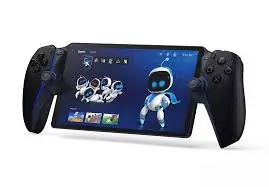
The PlayStation Portal is Sony’s first dedicated remote play device for the PS5. Think of it as a handheld screen that streams games directly from your PlayStation 5 – or, with a PlayStation Plus Premium subscription, directly from Sony’s cloud servers. It features a beautiful 8‑inch LCD screen (1080p resolution, 60fps), DualSense wireless controller features (haptic feedback, adaptive triggers), and Tempest 3D AudioTech via PlayStation Link or a 3.5mm headphone jack. This Midnight Black variant offers a sleek, stealthy alternative to the standard white version. But is it worth buying? It depends entirely on your network setup and gaming habits. This is not a standalone handheld (like the PlayStation Vita or Steam Deck). It’s a streaming device – and its performance lives or dies by your Wi‑Fi connection. Let’s dive into the details.
Key Specifications
| Specification | Detail |
|---|---|
| Display | 8″ LCD, 1080p resolution, 60fps |
| Connectivity | Wi‑Fi (broadband internet required, 5Mbps minimum, 15Mbps+ recommended) |
| Controller features | DualSense haptic feedback, adaptive triggers, built‑in speaker, 3.5mm audio jack, PlayStation Link (wireless audio) |
| Audio | Tempest 3D AudioTech (with compatible headset) |
| Remote Play (PS5) | Streams compatible games installed on your PS5 (PS5 and PS4 titles) |
| Cloud Streaming (PS Plus Premium) | Stream games from Game Catalog, Classics Catalog, and select digital PS5 games from your library – no downloads, no PS5 required |
| Color | Midnight Black (matte black finish) |
| Battery life | Approximately 4–6 hours (varies by brightness, haptics usage, and network conditions) |
| Charging | USB‑C |
| Required | PS5 console (for Remote Play) or PS Plus Premium subscription (for cloud streaming); broadband internet; PlayStation Network account |
Key Features & Benefits
🎮 Remote Play – Play Your PS5 Games Anywhere (In Your Home)
The Portal’s primary function is to stream games directly from your own PS5 console. How it works:
- Your PS5 must be powered on or in Rest Mode.
- Both the PS5 and the Portal need a broadband internet connection (Wi‑Fi).
- The Portal connects to your PS5 remotely (over your home network or even away from home – more on that below).
- You see your PS5 screen on the Portal’s 8″ display and control it with the built‑in DualSense controller.
Best for: Playing your PS5 games while someone else is using the TV, or gaming from bed, the couch, or another room in your house.
☁️ Cloud Streaming (PS Plus Premium) – No PS5 Required
With a PlayStation Plus Premium subscription, the Portal can stream games directly from Sony’s cloud servers. Benefits:
- Access to hundreds of games from the Game Catalog and Classics Catalog (PS5, PS4, and classic titles).
- Stream select digital PS5 games from your library – no downloads, no installs.
- No PS5 required – You can use the Portal as a standalone cloud gaming device (with a Premium subscription).
This is a huge selling point. If you don’t own a PS5 but want to play PlayStation games, or if you’re traveling away from your console, cloud streaming keeps you gaming.
🖥️ Beautiful 8″ LCD Screen – 1080p at 60fps
The Portal features an 8‑inch LCD display with 1080p resolution and a 60fps refresh rate. For a handheld streaming device, this is excellent. Benefits:
- Sharp, detailed image – Games look crisp and vibrant.
- Smooth motion – 60fps provides fluid gameplay (provided your network can keep up).
- Brightly lit – Good visibility even in moderately lit rooms.
It’s not OLED (like the Steam Deck OLED or Nintendo Switch OLED), so blacks aren’t as deep. But for an LCD, it’s very good.
🎮 Full DualSense Features – Haptic Feedback & Adaptive Triggers
Unlike third‑party remote play solutions (smartphone + clip), the Portal includes full DualSense controller functionality built into the device:
- Haptic feedback – Feel nuanced vibrations (rain, footsteps, explosions).
- Adaptive triggers – Variable resistance in L2/R2 (bow tension, brake feel, gun recoil).
- Built‑in speaker – For game audio or voice chat.
- 3.5mm headphone jack – Wired audio.
- PlayStation Link – Wireless audio (supports Sony’s Pulse Explore and Pulse Elite headsets).
This makes the Portal feel like a true extension of the PS5, not a compromise.
🔊 Tempest 3D AudioTech
The Portal supports Tempest 3D Audio when using a compatible headset (wired via 3.5mm or wireless via PlayStation Link). This provides immersive, positional audio – hear enemies sneaking up behind you or rain falling around you.
🎨 Midnight Black Aesthetic
The standard Portal is white. This Midnight Black variant offers:
- Stealthy, matte black finish – Hides fingerprints, matches black PS5 consoles and accessories.
- Subtle gray/black detailing – Elegant and understated.
- Less prone to visible wear than white (which can show dirt over time).
Pros (Advantages)
✅ Excellent screen – 8″ 1080p at 60fps is sharp and smooth.
✅ Full DualSense features – Haptics, adaptive triggers, audio jack – no compromises.
✅ Two ways to play – Remote Play from your PS5, or Cloud Streaming with PS Plus Premium (no PS5 needed).
✅ Tempest 3D Audio – Immersive sound with compatible headsets.
✅ Midnight Black color – Sleek, stealthy, resists visible smudges.
✅ Good battery life – 4–6 hours is solid for a streaming device.
✅ USB‑C charging – Modern, convenient.
✅ Great for sharing the TV – Someone watches Netflix while you game.
✅ Comfortable ergonomics – Essentially a DualSense controller split in half with a screen in the middle. Very comfortable for long sessions.
Cons (Disadvantages)
❌ Network dependent – If your Wi‑Fi is poor, the Portal is a paperweight. Requires at least 5Mbps (15Mbps+ recommended for good quality).
❌ No Bluetooth for standard headphones – Uses PlayStation Link (proprietary) or 3.5mm wired. You cannot connect standard Bluetooth earbuds directly.
❌ Latency – Even on a good network, there is some input lag. Competitive multiplayer games (Call of Duty, fighting games) may be frustrating. Single‑player, RPGs, and turn‑based games are fine.
❌ Not a standalone console – Cannot play games natively. It streams only.
❌ No Wi‑Fi 6E or 5G cellular – Relies on standard Wi‑Fi 5 or 6 (depending on router). No mobile data option.
❌ Requires PS Plus Premium for cloud streaming – That’s an additional monthly fee (17.99/monthor159.99/year in the US).
❌ PS5 must be in Rest Mode for Remote Play – If your PS5 is off or disconnected, Remote Play won’t work (though cloud streaming still works with Premium).
❌ No app store – Only does PlayStation streaming. Cannot run Netflix, YouTube, or other media apps natively.
❌ Price – $199.99. Not expensive for what it does, but you need a strong network and potentially a Premium subscription.
❌ Not ideal for travel (Remote Play) – Remote Play over the internet away from home depends entirely on your home upload speed and the destination’s download speed – often unreliable.
Who Is This For?
The PlayStation Portal is perfect for:
- PS5 owners with strong home Wi‑Fi – Play while someone else uses the TV.
- People who want to game in bed, on the couch, or in another room – Ultimate comfort.
- PS Plus Premium subscribers – Access to hundreds of cloud games without a PS5.
- Gamers who primarily play single‑player, RPG, or turn‑based games – Latency is less noticeable.
- Parents or partners who share the TV – No more fighting over screen time.
- Collectors who want the sleek Midnight Black aesthetic – Looks great alongside black PS5 accessories.
Who Should Skip This?
- Competitive multiplayer gamers – Input lag (even small amounts) is a dealbreaker for esports titles.
- People with poor or congested Wi‑Fi – You’ll experience stuttering, lag, and disconnects.
- Anyone expecting a Steam Deck or Switch – This is a streaming device, not a standalone handheld.
- People who want to play offline – The Portal requires an internet connection at all times.
- Those who already have a laptop or tablet + controller – You can remote play on those devices for free (though the Portal is more integrated).
Network Requirements – Be Honest With Yourself
The Portal’s performance is entirely dependent on your network. Here’s what you need:
| Requirement | Minimum | Recommended |
|---|---|---|
| Download speed | 5 Mbps | 15+ Mbps |
| Upload speed (for Remote Play from home) | 5 Mbps | 15+ Mbps |
| Wi‑Fi standard | 802.11ac (Wi‑Fi 5) | Wi‑Fi 6 (802.11ax) |
| Router quality | Basic | Good quality, low congestion |
| PS5 connection (for Remote Play) | Ethernet (strongly recommended) | Ethernet |
If your PS5 is on Wi‑Fi and your router is old or congested, expect a poor experience. For best results:
- Connect your PS5 via Ethernet cable to your router.
- Use a quality Wi‑Fi 6 router (or at least good Wi‑Fi 5).
- Minimize interference – reduce other devices streaming video, downloading, etc.
- For gaming away from home, results vary wildly. Don’t buy the Portal primarily for travel unless you have excellent internet at both ends.
Cloud Streaming vs. Remote Play – Which Should You Use?
| Feature | Remote Play (from your PS5) | Cloud Streaming (PS Plus Premium) |
|---|---|---|
| Requires PS5? | Yes | No |
| Requires PS Plus Premium? | No (but needs PS5) | Yes |
| Game selection | Your installed games (PS5/PS4) | Game Catalog + Classics Catalog + select digital PS5 games |
| Save data | Uses your console saves | Cloud saves (must be synced) |
| Latency | Lower (home network) | Higher (internet to Sony servers) |
| Quality | Varies by home network | Varies by internet speed |
| Best for | Playing your own games at home | Accessing games without a PS5, or away from home |
Battery Life – Real World
Sony claims 4–6 hours. In practice:
- Max brightness, heavy haptics, high volume – closer to 4 hours.
- Lower brightness, minimal haptics, headphones – 5–6 hours.
- Charging – USB‑C; full charge takes about 2–3 hours.
This is sufficient for most gaming sessions. The Portal also supports pass‑through charging – you can play while plugged in.
Audio Options
| Option | Quality | Latency | Compatibility |
|---|---|---|---|
| Built‑in speaker | Decent | N/A | Always available |
| Wired (3.5mm jack) | Excellent | Minimal | Any wired headset |
| PlayStation Link | Excellent | Very low | Sony Pulse Explore, Pulse Elite (sold separately) |
| Bluetooth | ❌ NOT SUPPORTED | – | No standard Bluetooth earbuds |
Important: You cannot connect standard AirPods or other Bluetooth headphones to the Portal. You need wired headphones, PlayStation Link headphones, or use the built‑in speaker.
Comparison with Other Handhelds
| Feature | PlayStation Portal | Steam Deck OLED | Nintendo Switch OLED | Backbone + Phone |
|---|---|---|---|---|
| Game library | Streams PS5/PS4 games (or cloud) | PC games (Steam, Epic, etc.) | Nintendo exclusives | Any cloud/remote play app |
| Plays natively? | No (streaming only) | Yes (local hardware) | Yes | No (streaming only) |
| Screen | 8″ LCD 1080p/60 | 7.4″ OLED 90Hz | 7″ OLED 720p/60 | Phone dependent |
| Controller | Full DualSense | Steam Deck controls | Joy‑Cons | Backbone (phone dependent) |
| Battery life | 4–6 hours | 2–8 hours (heavy games less) | 4–9 hours | Phone dependent |
| Price | $199 | $549+ | $349 | $100 + phone |
| Best for | PS5 owners with good Wi‑Fi | PC gamers, offline play | Nintendo exclusives | Budget, already have a phone |
Verdict: The Portal is not a competitor to the Steam Deck or Switch – it’s a different category entirely. It’s an accessory for PS5 owners, not a standalone gaming device.
Final Verdict
The PlayStation Portal Remote Player – Midnight Black is a niche but excellent product – for the right person. If you have a PS5, a strong home network (PS5 wired via Ethernet, good Wi‑Fi for the Portal), and you often find yourself wanting to play while someone else uses the TV, the Portal is a game‑changer. The 8″ 1080p screen is beautiful, the full DualSense features (haptics, adaptive triggers) make it feel like a true extension of the console, and the Midnight Black color is sleek and stylish.
The addition of cloud streaming (with PS Plus Premium) means you don’t even need a PS5 to use the Portal – though the subscription cost adds up. For existing Premium subscribers, it’s a fantastic bonus.
But the Portal is not for everyone. If your Wi‑Fi is spotty, if you mostly play competitive multiplayer games (latency matters), or if you want a standalone handheld that works offline, look elsewhere. The Portal is entirely dependent on the internet, and its performance lives or dies by your network quality.
At $199, it’s not cheap, but it’s also not expensive compared to other handhelds. Think of it as a specialized accessory – like a racing wheel or a fighting stick – rather than a necessity. If it fits your use case, you’ll love it. If not, it will frustrate you.